Introduction
Neural networks are used in many different areas, from recommendation systems to autonomous cars. Andrej Karpathy’s post on recurrent neural networks introduced me to some very enjoyable examples of text generation. However, text is not the only sequence we can generate. What about music?
We can already see great efforts in this area, such as Google’s Magenta and AIVA, a Luxembourg-based music-generation startup. Especially AIVA’s music impressed me. With this inspiration, I wanted to start my own journey into music and speech with deep learning. This blog post explains my first step in that journey.
My idea was to read piano MIDI files, represent their notes as a matrix, and train an LSTM to predict what comes next. After that, I would convert the generated matrix back into a MIDI file and listen to the result.
I will share snippets here so we can look at the process step by step. These snippets have been corrected and simplified since the first version; they are not a reproduction of the original training run.
AI summary
This first experiment learns to predict piano-roll steps from MIDI and converts the predictions back into music. The archived audio belongs to the original implementation.
LSTM
Colah’s post gives great insight into LSTMs. I highly recommend it. Also, I will try to explain the main idea here.
A traditional feedforward network processes its input without maintaining a state between successive inputs. As you can imagine, if you cannot remember earlier information, producing a meaningful sentence—or a musical phrase—becomes difficult. Recurrent neural networks help with this by carrying a hidden state through the sequence.
However, a vanilla RNN has another problem: the vanishing gradient. At this point, you might ask what a gradient is and why this problem is a big deal. Let me explain these concepts in one paragraph.
For a function with one input, its derivative tells us how the output changes as the input changes. With many parameters, the gradient collects these partial derivatives. In deep learning, we use this information to update weights and biases so the loss becomes smaller. The gradient points towards the steepest increase, so gradient descent moves in the opposite direction. We repeat this process: make a prediction, calculate the loss, and update the parameters.
When gradients become very small as they travel backwards through a long sequence, earlier computations receive very little learning signal. Thus, the network has difficulty learning relationships across distant time steps. An LSTM uses a cell state and gates to help control what information is kept, updated, or forgotten. This helps with learning longer dependencies, although it does not guarantee that the model will understand the structure of an entire composition.
AI summary
An LSTM carries information across time steps and uses gates to help preserve useful context. Gradient descent reduces the loss by moving opposite to the gradient.
.mid files
.mid files contain MIDI data. MIDI stands for Musical Instrument Digital Interface.
Unlike .mp3 or .wav files, MIDI files do not contain the actual recorded sound. They describe musical events: which notes are played, when they start, how long they last, and their velocities. A synthesizer uses these events to produce audio.
A MIDI file can include different instruments, such as flute, oboe, or bass. However, for this post, I am using only the piano part. Keeping one instrument made the first experiment easier for me to work with.
One timing detail is important for the code below: music21 expresses offsets and durations in quarter-note units. A value of 0.25 means a sixteenth note. It does not mean a fixed number of seconds; that depends on the tempo.
AI summary
MIDI stores musical events rather than recorded audio. This experiment keeps the piano part and measures time in musical quarter-note units.
Framework
I used Keras as my deep-learning framework, with TensorFlow as the backend. At the time, it was easier for me to work with than the lower-level TensorFlow API.
This let me spend more time on the MIDI representation and the generation process. The original notebook uses the APIs available in 2018; the illustrative model later in this post uses updated Keras syntax.
AI summary
The original experiment used Keras with TensorFlow. The snippets use updated syntax while keeping the same next-step prediction task.
Music21
music21 is a Python toolkit for computer-aided musicology, developed at MIT with contributions from its community. People use it to study musical scores, work with notation, and create or analyze musical examples.
I used music21 to read .mid files and extract notes, durations, and offsets. These were the pieces of information I needed to create a matrix for the model. Furthermore, I used the same toolkit to create a new MIDI file from the generated matrix.
So, music21 sits on both sides of this experiment: first to read the music, and then to write the result.
AI summary
music21 provides the bridge between MIDI files and the numeric representation used by the model, both before training and after generation.
Code part: from MIDI to a matrix
When we want to feed a deep-learning model, we need numeric input. So, first we should convert the MIDI files into arrays. For this process, I need three things:
- The notes: which pitches are played.
- Their durations: how long they are played.
- Their offsets: when they are played.
Let’s start! Firstly, we select the piano part and extract these values. A single note contributes one pitch; a chord contributes several pitches at the same time.
In my first implementation, the horizontal axis represented time and the vertical axis represented pitch. This looks a little like a spectrogram, but it contains symbolic MIDI pitches rather than measured frequency energy. There are 128 MIDI pitch values. For time, I chose a grid of 0.25 quarter-note units, which was a convenient starting point for the music I was using. It does not represent every possible rhythm exactly.
I spent quite a lot of time working out how to distinguish a long note from many short notes of the same pitch. According to my trials, a useful approach was to give the first touch a larger value and the continuation a smaller one. For example, a C4 lasting 0.75 quarter-note units becomes [1.0, 0.5, 0.5], while three separate C4 notes of 0.25 each become [1.0, 1.0, 1.0]. A value of 0.0 represents an inactive pitch.
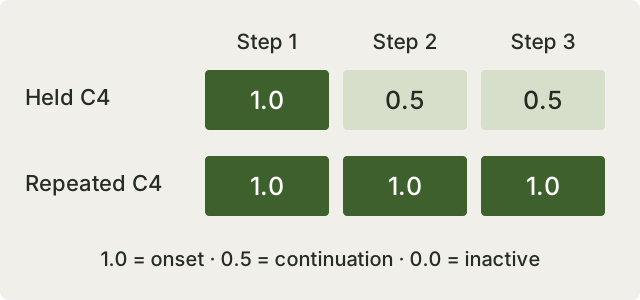
I also considered adding some randomness within the value ranges for onsets and continuations. For the example here, I am keeping the values fixed so the representation is easier to follow.
Now, let’s put these steps into a function. This version uses shape (time_steps, 128) from the beginning. It also uses music21’s public properties instead of extracting numbers from strings.
import numpy as np
from music21 import chord, converter, instrument, note, stream

STEP = 0.25  # quarter-note units


def midi_to_roll(filename, step=STEP):
    score = converter.parse(filename)
    parts = instrument.partitionByInstrument(score)
    if parts is None:
        raise ValueError("No instrument parts found")

    piano_parts = [
        part for part in parts.parts
        if isinstance(
            part.getInstrument(returnDefault=False), instrument.Piano
        )
    ]
    if not piano_parts:
        raise ValueError("No explicitly labelled piano part found")

    piano = piano_parts[0].stripTies(inPlace=False).flatten()
    events = []
    for event in piano.notes:
        duration = float(event.duration.quarterLength)
        if duration <= 0:
            continue
        start = int(round(float(event.offset) / step))
        end = max(start + 1, int(round(
            (float(event.offset) + duration) / step
        )))
        pitches = event.pitches if isinstance(event, chord.Chord) else [event.pitch]
        events.append((start, end, pitches))

    ticks = max((end for _, end, _ in events), default=0)
    roll = np.zeros((ticks, 128), dtype=np.float32)
    for start, end, pitches in events:
        for pitch in pitches:
            midi_pitch = int(pitch.midi)
            roll[start, midi_pitch] = 1.0
            roll[start + 1:end, midi_pitch] = np.maximum(
                roll[start + 1:end, midi_pitch], 0.5
            )

    return roll
Now we have the pitch, duration, and offset information represented in one array. Using pitch.midi handles sharps, flats, and octaves without a separate hand-written conversion function.
There are still some limits to this representation. It does not preserve velocity or pedal information, and overlapping notes with the same pitch are ambiguous. Also, this function expects an explicitly labelled piano part. If your MIDI file does not have one, you should choose the appropriate part yourself instead of silently treating another instrument as piano.
AI summary
Each time step stores inactive, onset, or continuation states for 128 pitches. Distinguishing onsets from sustains preserves the difference between held and repeated notes.
Build the dataset
Now we can create a dataset from MIDI files with this conversion. In my original experiments, I worked with collections including piano pieces by Schumann.
Firstly, I converted the MIDI files one by one and collected their matrices. After that, I saved the NumPy data as .npy files so I could load it later without parsing the MIDI files again. This was also useful when moving between my local environment and a notebook.
The pieces do not necessarily have the same length. In this walkthrough, we can keep a list of separate arrays instead of forcing them into one rectangular array or concatenating their time axes. Each piece will then supply its own training windows.
If the input files come in a ZIP archive, the same process applies after extracting them: read each MIDI file, select the piano part, convert it, and keep its identity with the resulting array.
AI summary
Convert and cache each composition separately. Keeping piece boundaries makes it possible to build training examples without artificial transitions between compositions.
Transform the dataset
When I first loaded my data, I had to pay attention to the shape of the array. My initial representation placed pitch before time, so I transposed it before feeding the LSTM. Here, each piece already has shape (time_steps, 128), which makes the next step more direct.
Finally, we need two arrays for training. The first contains a short sequence of previous steps, and the second contains the true next step. The model predicts that next step, and the optimizer updates its parameters according to the prediction error.
I used a context length of 18 steps and moved the window forward one step at a time. Let’s create those examples while keeping each window inside its own composition.
def training_windows(rolls, context=18):
    inputs, targets = [], []
    for roll in rolls:
        for start in range(len(roll) - context):
            inputs.append(roll[start:start + context])
            targets.append(roll[start + context])
    if not inputs:
        raise ValueError("No pieces are longer than the context window")
    return np.stack(inputs), np.stack(targets)


# Split MIDI files into training and validation sets before this step.
# train_rolls = [midi_to_roll(path) for path in train_paths]
# x_train, y_train = training_windows(train_rolls)
# x_valid, y_valid = training_windows(valid_rolls)
Now the input shape is (examples, 18, 128), and the target shape is (examples, 128).
We should split the MIDI files into training and validation sets before creating these overlapping windows. Otherwise, almost identical passages can appear in both sets. Different arrangements of the same composition should also stay together.
AI summary
The model uses 18 preceding piano-roll steps to predict one next step. Split by composition before making windows to avoid leakage between training and validation.
Build our deep-learning architecture
Now we can build our model with the Keras API. In the original experiment, I used three LSTM layers together with dense layers, temporal attention, LeakyReLU, batch normalization, and dropout.
Let’s look more closely at the layers:
- LSTM: the recurrent layer that processes the sequence. We use
return_sequences=Truewhen the following layer also needs the sequence of outputs. - LeakyReLU: an activation function with a small slope for negative inputs. This helps with the zero-gradient region of ReLU; it is not a general solution to vanishing gradients through time.
- Batch normalization: normalizes activations using batch statistics during training and moving statistics during inference. The Keras documentation explains this distinction.
- Dropout: randomly drops a fraction of activations during training as a regularization technique. It can help reduce overfitting, but its effect still needs to be evaluated. More information.
- Dense: a fully connected layer that applies a learned linear transformation and, optionally, an activation.
To compile the model, we also need an optimizer and a loss function. I used stochastic gradient descent, or SGD. With mini-batches, we calculate an update from a batch of examples rather than the entire dataset at once. The SGD update moves parameters opposite to the loss gradient, scaled by the learning rate.
There is an important correction to the original experiment. I used a 128-way softmax with categorical cross-entropy, but several pitches can be active at the same time. A softmax makes the outputs compete and sum to one, so it does not fit this polyphonic piano-roll target. The activation documentation is useful for understanding that difference.
For a simpler corrected example, the model below uses independent sigmoid outputs and mean squared error against the values 0.0, 0.5, and 1.0. This treats the task as regression. Another possible approach is to predict three classes separately for each pitch.
import keras
from keras import layers


def build_model(context=18):
    model = keras.Sequential([
        keras.Input(shape=(context, 128)),
        layers.LSTM(1024, return_sequences=True),
        layers.Dropout(0.3),
        layers.LSTM(512, return_sequences=True),
        layers.Dropout(0.22),
        layers.LSTM(128),
        layers.Dense(128, activation="sigmoid"),
    ])
    model.compile(
        optimizer=keras.optimizers.SGD(learning_rate=0.01),
        loss=keras.losses.MeanSquaredError(),
    )
    return model


model = build_model()
# model.fit(
#     x_train, y_train,
#     validation_data=(x_valid, y_valid),
#     batch_size=2, epochs=80, shuffle=True,
# )
This example keeps the three LSTM layers but leaves out the original attention and normalization blocks so we can follow the main task more easily. It is not compatible with the original saved weights, and the audio at the end of the post was not generated with this revised model.
AI summary
The output and loss must match a target with several simultaneous pitches. This simplified example uses independent outputs; the original audio remains evidence of the historical experiment only.
Training and generation
Now, when we feed our model with training data, it learns to predict the next column of musical information. After training, we can use those predictions to create a longer sequence.
This part was a little confusing for me. I tried different methods of turning the predictions into notes. For instance, I tried taking the highest-valued pitch as the first touch and another high-valued pitch as a continuation. However, that alone did not create enjoyable music.
In the original notebook, I experimented with ranking pitches and a temperature parameter. Applying a temperature transformation and then choosing by rank does not itself produce temperature-based random sampling. For the corrected regression example, let’s use a simpler rule: choose the nearest of the three states.
We start with a seed from an existing piece. Then we predict the next step, append it to the generated sequence, and repeat. At every iteration, the model receives only the most recent 18 steps.
def quantize(values):
    # Midpoints between 0.0, 0.5, and 1.0.
    return np.where(values < 0.25, 0.0,
                    np.where(values < 0.75, 0.5, 1.0)).astype(np.float32)


def generate(model, seed, steps=480, context=18):
    if seed.shape != (context, 128):
        raise ValueError("Seed must match the context length and 128 pitches")
    generated = seed.copy()
    for _ in range(steps):
        window = generated[-context:][None, ...]
        prediction = model.predict(window, verbose=0)[0]
        generated = np.vstack([generated, quantize(prediction)])
    return generated
As you can imagine, errors can accumulate when the model starts receiving its own outputs instead of the real training data. Also, predicting many inactive or sustained notes can give a small loss without producing music that is interesting to listen to. We still need to listen to the results and examine what the model is actually generating.
AI summary
Generation repeatedly feeds the predicted next step back into the model. The decoder here is deterministic; musical quality still needs listening and evaluation beyond the training loss.
Convert the matrix back to MIDI
The model produces an array, but we need a MIDI file if we want to listen to it. So, now let’s build the conversion in the other direction.
Firstly, we read the values for one pitch through time. When we find a first touch, we count the continuation steps after it. This tells us the duration of the note. Its position in the sequence tells us its offset. We repeat this for all pitches and put the resulting notes into a music21 stream.
A new first touch starts a new note, even if the same pitch was already playing. In the example below, a continuation without a preceding onset is treated as a new note so the prediction can still be rendered.
def roll_to_midi(roll, filename, step=STEP):
    states = quantize(np.asarray(roll))
    output = stream.Stream()
    output.insert(0, instrument.Piano())

    for midi_pitch in range(128):
        tick = 0
        while tick < len(states):
            if states[tick, midi_pitch] == 0.0:
                tick += 1
                continue
            start = tick
            tick += 1
            while tick < len(states) and states[tick, midi_pitch] == 0.5:
                tick += 1
            event = note.Note()
            event.pitch.midi = midi_pitch
            event.duration.quarterLength = (tick - start) * step
            output.insert(start * step, event)

    output.write("midi", fp=filename)
In my original decoder, I also added randomness to some note durations. Without that adjustment, many notes were very short, and I found the result less enjoyable. That was a listening-oriented post-processing choice, though; it does not mean the model had learned those longer rhythms. I have left that adjustment out of the corrected example.
AI summary
Decode each onset and its following continuation steps into a note with an offset and duration. Random changes made after prediction should be distinguished from rhythms learned by the model.
Results
Let’s listen to some outputs of the system.
For these outputs, I used 55 piano pieces from games and trained my model for roughly 15 hours on Google Colab. These are the results of the original experiment, not the revised example code above.
This was my first step into the area, and there was still a lot to improve. Working through the MIDI representation, the distinction between first touches and continuations, and the conversion back to music helped me understand the problem much better.
AI summary
The listening examples come from the original 55-piece, roughly 15-hour experiment. They illustrate an early exploration of music generation rather than a benchmark for the revised snippets.